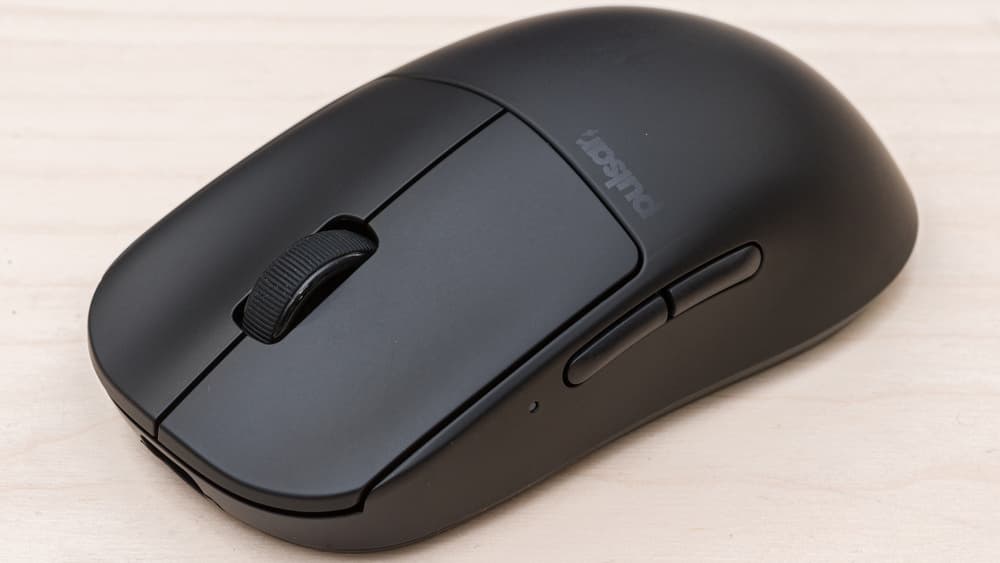
My friend who refuses to spend more than $40 on a mouse asked me last month which lightweight one was worth it. I said the Pulsar X2 V2. He bought one, used it for a week, and texted me 'okay I get it now.' That is roughly the experience this mouse delivers.
The shape is the first reason to care. It is a near-perfect symmetrical egg, in the lineage of the old Zowie EC and FK shapes, sized somewhere between a small and a medium. I have average-sized hands and use a relaxed claw grip, and this is the most comfortable lightweight mouse I have used — Razer's Viper V3 Pro is also good, but slightly longer and slightly more angular. The Pulsar feels neutral. It doesn't impose a grip style on you.
The build is the second reason. 55 grams without holes, which is the version I'd recommend; a hole-punched variant exists for the people who want 47g, but I don't see the point. The shell doesn't creak, the side buttons have a positive click without being mushy, and the main switches feel crisper than the optical switches on any of the older Pulsars. Pulsar shipped a small wrench in the box to tighten the screws after long use, which is the kind of detail that suggests somebody who has actually used a mouse for two years was on the design team.
The sensor is a PixArt 3395 running at 26K DPI, polling at up to 8,000Hz with the right dongle. None of those numbers matter at the desk; what matters is that tracking is flawless on every surface I tried, including a glass desk that has confounded other mice. I have not had a spinout in two months of use, including the kind of fast 180 flicks where cheaper sensors sometimes lose their place.
Battery is around 70 hours at 1000Hz polling, much less if you turn the polling up to 4K or 8K. I keep it at 1K because I cannot tell the difference and I don't want to charge a mouse twice a week. USB-C charging works fine, and the included paracord cable is one of the better stock cables I've used.
The weaknesses are honest. The software is improving but still not as polished as Logitech G Hub or Razer Synapse — sensible defaults, but onboarding feels rough if you've used the big-brand utilities. The scroll wheel is fine, not exceptional, and a noticeable downgrade from a G502 if you do a lot of long-form scrolling. There's no third-party Powerplay-style charging mat option, so when the battery dies you plug in a cable.
And this is a focused gaming mouse, not a productivity tool. Two side buttons, a scroll click, a DPI button on the bottom. If you've grown attached to extra macro buttons or a thumb wheel, look elsewhere. If you want exactly the number of buttons a mouse should have, this is the right number.
At around $95, it costs less than two-thirds what Razer or Logitech charge for a comparable shape, and the parts inside are the same parts. The premium-brand mice get you better software and better warranty support. The Pulsar gets you a better mouse.
Verdict: Buy this if you've been holding out on lightweight mice and you want to find out, cheaply, whether the hype is real. If you need extensive macros or polished software, stay in the Razer or Logitech ecosystem.